

How to Automate WhatsApp Follow-Ups Directly From Salesforce Flows, No Code Required
Your Salesforce Flows are already doing a lot of heavy lifting. They send email alerts when a deal moves stage. They assign tasks when a lead goes cold. They trigger onboarding sequences the moment a new account is created.
But if your customers are primarily on WhatsApp, and in most markets today they are, those flows are only doing half the job. The most responsive channel isn't in automation at all.
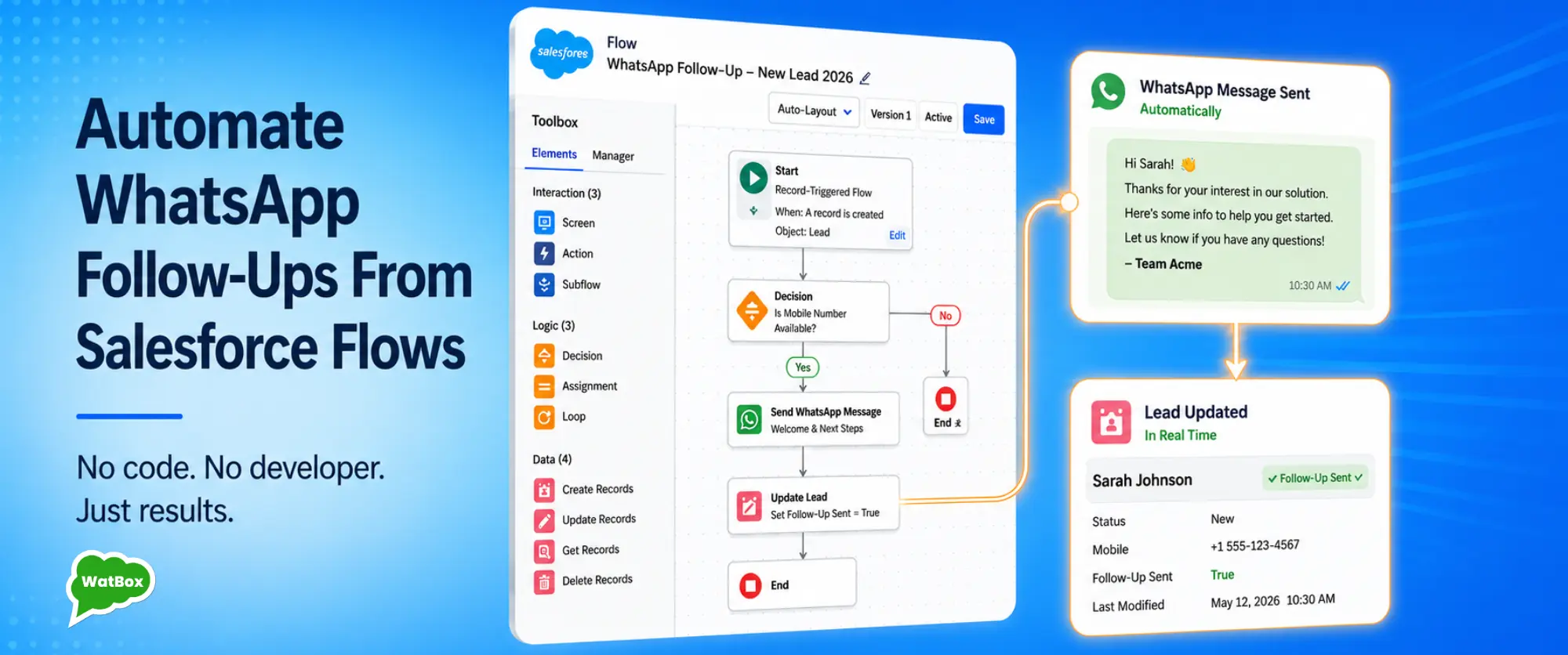
WatBox connects WhatsApp directly to Salesforce Flows, so admins can trigger WhatsApp messages the same way they trigger emails through a point-and-click Flow builder, with no developer involvement.
Here's what that looks like in practice.
Why WhatsApp Automation Belongs Inside Salesforce Flows
The standard argument for WhatsApp automation tools is that they let you build message sequences. And that's true, but if those sequences live outside Salesforce, you've created a second system of record for customer communications.
Leads get followed up via WhatsApp but the Salesforce record doesn't reflect it. Reps have no idea a message went out. If a customer replies, there's no context. Pipeline data is wrong because the most active touchpoints aren't logged.
WatBox keeps everything inside Salesforce. When a Flow triggers a WhatsApp message, that message is logged against the relevant record automatically. Replies come back into Salesforce. Admins can see exactly which automated messages went out, when, and whether they received a response.
The automation is Salesforce-native. The data stays in Salesforce. The rep always has context.
6 Salesforce Flow Automations WatBox Customers Run in Production
1. Instant Welcome Message on New Lead Creation
Trigger: Record Created on Lead object
Action: Send WhatsApp template message - "Hi [First
Name], thanks for reaching out to [Company]. We'll be in touch
within [X] hours. In the meantime, can you tell us more about what
you're looking for?"
This fires within seconds of a Lead being created. The customer knows they've been heard before any rep has even seen the notification. Response rates on this kind of immediate follow-up are significantly higher than a same-day email.
2. Follow-up When a Lead Goes Cold
Trigger: Scheduled Flow - Lead last activity date
is 5 days ago, Status = Open
Action: Send WhatsApp template message - "Hi [First
Name], just checking in. Are you still interested in
[Product/Service]? Happy to answer any questions."
This replaces the manual chase list most sales teams maintain. Admins configure the criteria once and Salesforce handles the follow-up automatically.
3. Appointment Reminder 24 Hours Before a Scheduled Meeting
Trigger: Scheduled Flow - Event date is tomorrow
Action: Send WhatsApp reminder asking the customer
to confirm or reschedule.
Confirmation rates on WhatsApp reminders are dramatically higher than email reminders. Replies are captured back into Salesforce automatically.
→ See how WatBox handles appointment booking and reminders
4. Deal Won - Trigger Onboarding Sequence
Trigger: Opportunity Stage changed to Closed
Won.
Action: Automatically send onboarding information
and next steps via WhatsApp.
5. Case Resolved - Send CSAT via WhatsApp
Trigger: Case Status changed to Closed.
Action: Send a WhatsApp CSAT survey and capture the
response back into Salesforce reporting.
6. Payment Reminder Before Invoice Due Date
Trigger: Scheduled Flow - Invoice due in three
days.
Action: Send an automated payment reminder via
WhatsApp and route replies back to the account owner.
What Admins Need to Set This Up
No Apex. No middleware. No external automation platform.
- Install WatBox from the Salesforce AppExchange.
- Connect your WhatsApp Business Account during guided onboarding.
- Create or edit a Salesforce Flow.
- Add a WatBox Flow Action.
- Select your approved WhatsApp template.
- Map Salesforce fields to template variables.
- Activate the Flow.
Most customers have their first WhatsApp automation running within the same week they install WatBox.
One Important Detail: Template Messages vs. Session Messages
WhatsApp has two message types that behave differently.
- Template Messages: Pre-approved by Meta and used for automated outbound messaging.
- Session Messages: Free-form replies within the 24-hour customer service window.
WatBox manages both automatically, allowing admins to focus on Flow logic instead of API behaviour.
The Payoff: A Salesforce That Works While Your Team Sleeps
Flow-based WhatsApp automation delivers consistency. Every new lead gets welcomed. Every appointment gets a reminder. Every closed case gets a CSAT survey. Every payment reminder goes out on schedule.
Since everything runs through Salesforce Flows, every message is logged, every reply is captured, and every interaction becomes reportable inside Salesforce.
Try WatBox Free for 15 Days
If you're a Salesforce admin who's ever wished you could automate WhatsApp inside Salesforce Flows the same way you automate email, WatBox is exactly that.
