 Available on Salesforce AppExchange
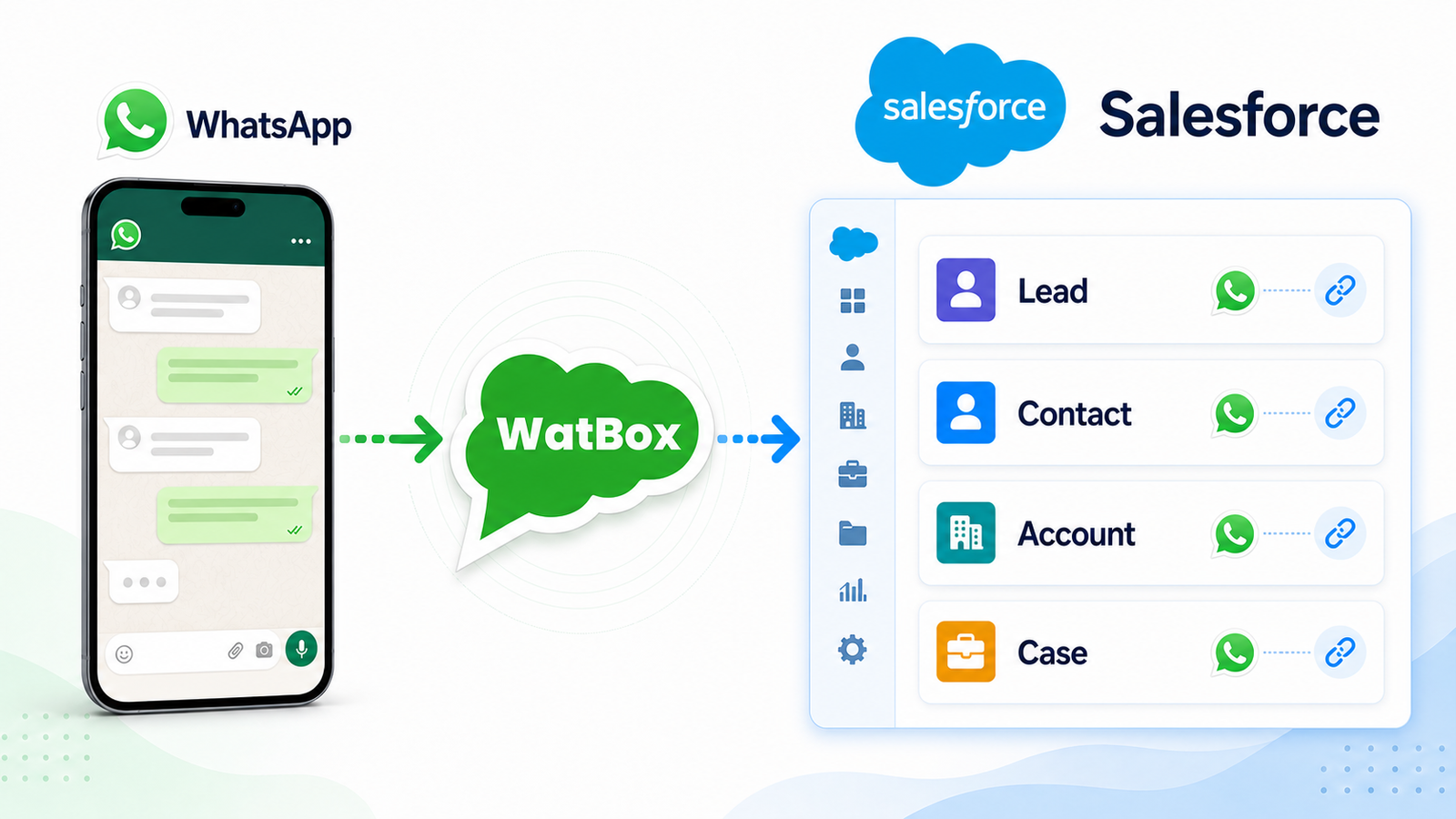
Customer messages your WhatsApp number
Any inbound WhatsApp message — text, media, location, or voice note — arrives through your verified WhatsApp Business number.


 WhatsApp
 WatBox
 Salesforce
Tell us about your Salesforce setup and WhatsApp use case. The submission goes directly to the WatBox Salesforce team.
These are the gaps WatBox is built to close, the moment customer conversations start moving faster than your CRM updates.

Reps message customers from their own handsets. When someone leaves, the thread and often the relationship leaves with them.

Messages sit in a separate tool while the CRM stays empty. Nobody updates two systems, so pipeline data quietly rots.

Branches, dealers and partners run their own numbers. No consent record, no oversight, nothing to show when compliance asks.













No middleware, no manual logging. WatBox is a native Salesforce managed package — every message writes straight to your org.
Any inbound WhatsApp message — text, media, location, or voice note — arrives through your verified WhatsApp Business number.
The conversation is logged against the matching Lead, Contact, Account, or Case — or a new record is created automatically.
No separate app. Reps send and receive WhatsApp messages directly from the record they're already working in.
Consent, ownership, and conversation history stay in Salesforce — visible to the whole team, ready for reporting and audit.
WatBox isn't just an integration—it's an ecosystem native app. As official Salesforce and Meta Business Partners, we guarantee enterprise-grade security, instant API updates, and zero data leakage outside your org.

Built directly on the Salesforce platform, WatBox ensures your data never leaves your CRM. Enjoy seamless integration with standard objects, Flows, and reporting while meeting the highest enterprise security standards.
As an official Meta Business Partner, WatBox provides direct, approved access to the WhatsApp Business API. Skip the complex approval queues, eliminate third-party risk, and get your team communicating efficiently.

One inbox for every conversation — inside the CRM your team already runs on.

Send and receive WhatsApp messages from any Lead, Contact, Account, or Case — no separate app, no exporting, no lost history.

Pre-approved WhatsApp templates that pull live data from the Salesforce record.

Send personalized broadcasts to segmented Leads, Contacts, or custom lists — with merge fields and scheduling, tracked like every other conversation.

Keyword and AI-driven replies answer common questions instantly, day or night, before a rep ever has to.

Make and receive WhatsApp voice calls from any Salesforce record — every call auto-logged alongside the chat thread.

Images, PDFs, location pins, and contact cards, all logged on the record automatically.

Keep using the WhatsApp Business app on your phone while also using WatBox in Salesforce — the same number works in both.
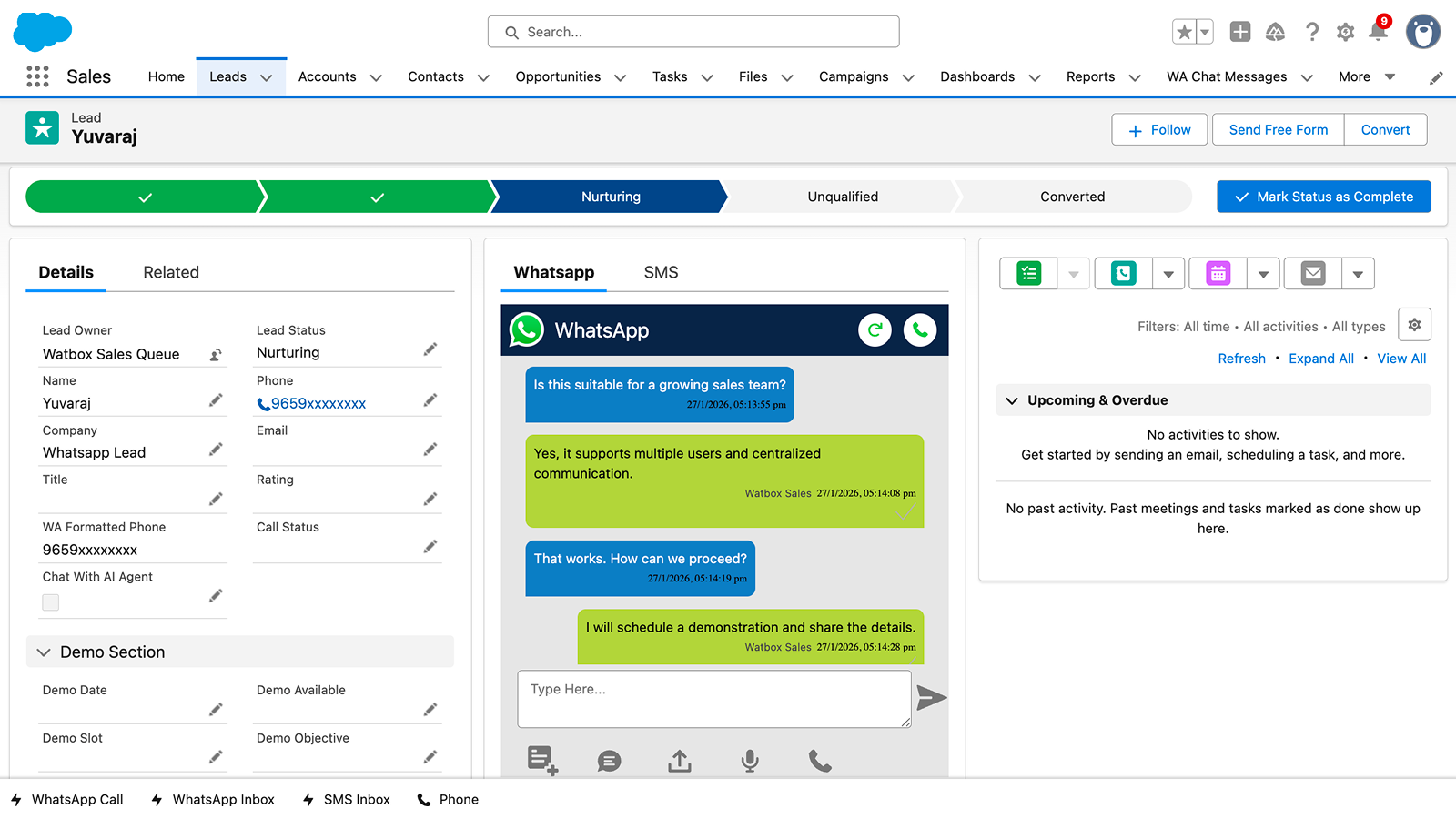
This is a real-time simulation of how a sales rep closes a deal using WhatsApp directly inside Salesforce. Stop switching tabs, eliminate manual data entry, and keep full context.
Instant Lead Response
Respond to WhatsApp inquiries within seconds, not hours
Auto-Logged to CRM
Every message is captured on the Contact record automatically
Automated Outreach
Trigger standard replies based on conversation context and Flows
See why WatBox wins against legacy aggregators.
|
Capabilities
|
WatBox.ai
RECOMMENDED
|
Standard Tools
|
|---|---|---|
|
|
Fast Deployment (Hours)
|
Pro-Serv Required (Weeks)
|
|
|
Guided Partner Onboarding
|
Manual Approval Bottlenecks
|
|
|
100% Native
|
External Tab/iFrame
|
|
|
✓
|
✕
|
Stop switching apps. Get a native WhatsApp Salesforce Integration with WatBox.
Link your WhatsApp Business number to WatBox inside Salesforce.
Choose which Salesforce objects receive messages and logs.
Set up approved templates and AI auto-replies.
Start sending and receiving — track everything in Salesforce reports.
Yes. WatBox connects to the WhatsApp Business API and installs as a native Salesforce managed package. Reps send and receive WhatsApp messages — text, media, location, documents, voice notes, and WhatsApp Calls — directly from any Lead, Contact, Account, or Case record, with no external dashboards or separate logins.
Yes — you'll need a WhatsApp Business API account through Meta Business Manager. As a certified Meta Business Partner, WatBox provides guided onboarding to navigate the approval process and remove common roadblocks.
Yes. Send personalized broadcasts to Leads, Contacts, or any custom Salesforce list using Meta-approved templates with merge fields. Delivery, read, and reply rates are tracked natively in Salesforce reports.
Yes. All data stays inside your Salesforce org — WatBox does not store messages externally. Consent management, retention policy, and opt-out handling are built in, and WatBox has passed Salesforce's AppExchange security review.
Yes. WatBox includes a built-in AI layer that can auto-respond to inbound WhatsApp messages — answering common questions, qualifying leads, and escalating to a human agent when needed. Every conversation stays in Salesforce.
Pricing depends on your Salesforce org size, message volume, and AI usage. Book a demo for a custom quote.

See your WhatsApp conversations land on the right Lead, Contact, or Case — no copy-paste, no side inbox.