

How to Send a WhatsApp Broadcast Campaign From a Salesforce Campaign Record
Email open rates for B2C marketing have been declining for years. If your team is still relying entirely on Salesforce Campaigns pushing email blasts, you already know the problem: low opens, lower clicks, and a growing segment of your contact list that simply doesn't respond to email at all.
WhatsApp broadcast messages sit at the other end of the engagement spectrum — open rates above 90%, response times measured in minutes, and customers who actually read what you send them.
The problem, until now, has been operational. Running a WhatsApp broadcast meant exporting a list from Salesforce, uploading it to a third-party messaging platform, managing opt-outs manually, and reconciling engagement data back into your CRM after the send. It was a separate workflow that undermined the point of having a CRM in the first place.
WatBox makes WhatsApp broadcasting a native Salesforce Campaign action. Here's exactly how it works.
What "Native Salesforce Campaign" Actually Means
When we say WatBox makes WhatsApp campaigns native to Salesforce, we mean the entire workflow — list selection, template choice, send, delivery tracking, and opt-out management — happens inside Salesforce. There is no export. There is no third-party platform login. There is no separate dashboard to check after the send.
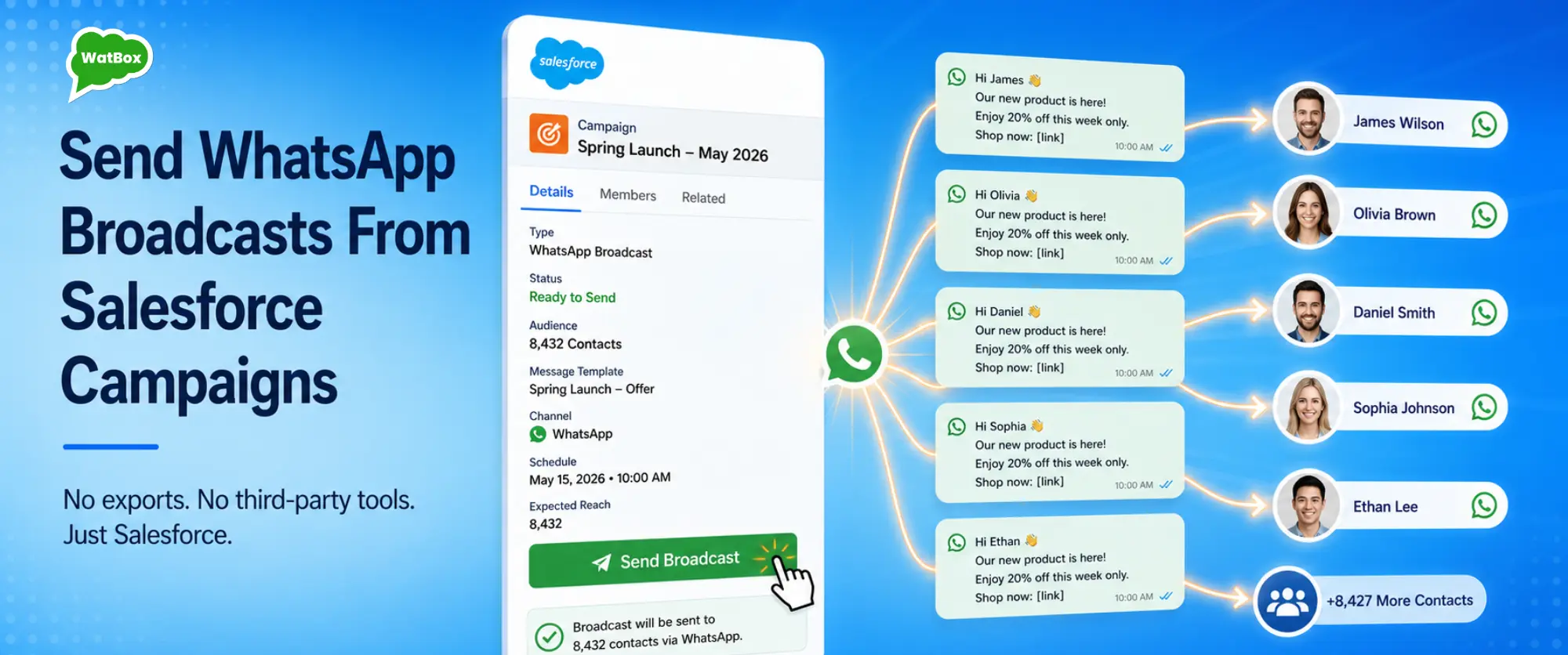
Your marketing ops team selects a Salesforce Campaign, picks an approved WhatsApp template, and sends. Everything that happens after that — deliveries, reads, replies, opt-outs — flows back into Salesforce against the correct Campaign and Contact records.
The Campaign Workflow Step by Step
Step 1: Build your Campaign and add members in Salesforce
Nothing changes here. You create a Salesforce Campaign the way you always do — define the audience, add Campaign Members from Leads or Contacts, set the Campaign Type and Status. WatBox doesn't change your Campaign setup process.
The only prerequisite is that the contacts you're targeting have a mobile number in Salesforce and have opted in to WhatsApp communications. WatBox checks opt-in status automatically at send time and excludes anyone who hasn't consented.
Step 2: Select your WhatsApp message template
WhatsApp Business API requires outbound messages to contacts outside an active 24-hour session to use pre-approved message templates. These are approved by Meta and typically take 24–48 hours to review.
WatBox helps you get templates approved during onboarding. Once approved, they appear in a dropdown inside Salesforce. Your team selects the template, previews how it will look with personalization fields populated from Salesforce data, and confirms the send.
Templates support dynamic variables such as first name, company name, product name, appointment date, or any Salesforce field you want to pull in. Every message is personalized, even at scale.
Step 3: Send to Campaign Members in one action
With the Campaign selected and the template confirmed, you send. WatBox handles the API-level sending through WhatsApp Business API — rate limiting, delivery queuing, and error handling are all managed behind the scenes.
For large sends, WatBox processes the queue progressively and surfaces delivery status in real time inside Salesforce.
Step 4: Track delivery, engagement, and replies in Salesforce
After the send, every Campaign Member record is updated with their delivery status. You can report on this the same way you'd report on email campaign metrics — delivered, opened, replied, and opted out.
Replies from contacts come back into Salesforce as WhatsApp conversations linked to the relevant Contact or Lead record. If a contact replies to your campaign message, that conversation is immediately visible to the assigned rep in their Salesforce queue.
→ See how WatBox handles WhatsApp marketing and campaign tracking →
Opt-Out Management: Automatic and Compliant
This is the operational detail that causes the most headaches when WhatsApp campaigns are managed outside Salesforce. When a contact opts out — either by replying STOP or through Meta's opt-out mechanism — that opt-out needs to be reflected in your CRM immediately.
WatBox handles this automatically. The moment an opt-out is registered, the relevant Salesforce Contact or Lead is updated with an opt-out flag. That record is excluded from all future WatBox-driven WhatsApp sends. No manual list management. No CSV cross-referencing. Compliance is maintained in real time.
What Types of Campaigns Work Best on WhatsApp
Not every message type belongs on WhatsApp. The channel works best for messages with high personal relevance and a clear next action. Here are some of the campaign types WatBox customers use successfully:
- Re-engagement campaigns. Contacts who haven't engaged with email in 90+ days often respond to WhatsApp with a short, personalized message.
- Event and webinar reminders. Timely reminders reduce no-show rates and provide attendance confirmations through simple WhatsApp replies.
- Product launch announcements. Reach customers on their most active messaging channel with new product updates and limited-time offers.
- Renewal and expiry reminders. Insurance, subscriptions, and contract renewals are ideal use cases for automated WhatsApp notifications.
- Post-purchase follow-ups. Collect feedback, offer onboarding assistance, or strengthen customer relationships after a purchase.
Reporting: What You Can Measure After a WhatsApp Campaign
Once your campaign data lives in Salesforce, you can report on it just like any other Campaign performance. Marketing teams commonly track:
- Delivery rate — percentage of contacts that successfully received the message.
- Reply rate — the percentage of recipients who responded.
- Opt-out rate — segmented by campaign, template, or audience.
- Conversions — bookings, purchases, or demo requests associated with the campaign.
Over time, this data helps marketing teams identify which templates and audience segments generate the strongest engagement, allowing future campaigns to be optimized using Salesforce reporting.
How This Compares to Running WhatsApp Campaigns Outside Salesforce
The common alternative is a standalone WhatsApp marketing platform that requires uploading contact lists, managing broadcasts externally, and reviewing analytics in a separate dashboard.
While these tools may offer messaging capabilities, they separate customer conversations and campaign engagement from your CRM. Reps don't know who received a campaign before making a call. Replies don't automatically appear in Salesforce. Campaign ROI becomes harder to measure against pipeline data.
WatBox keeps campaign execution, engagement tracking, and customer replies inside Salesforce, making WhatsApp a fully integrated part of your marketing, sales, and service workflows.
Start Your Free Trial
WatBox gets your first WhatsApp Campaign live inside Salesforce within days of installation. Try it free for 15 days — no credit card required.
