

WhatsApp Messages Are Happening, But None of It Is in Your Salesforce Reports
Your sales rep closed a deal last month. The last three touchpoints that moved the prospect over the line? WhatsApp messages. None of them are in Salesforce.
This is one of the most common , and most expensive , blind spots in modern sales and service operations. Teams using WhatsApp to communicate with customers are creating a shadow channel: high-volume, high-intent conversations that exist entirely outside your CRM. No activity history. No reporting. No accountability. No coaching data.
If you're a sales ops leader, Salesforce admin, or RevOps manager, this isn't a minor annoyance. It's a fundamental gap in your pipeline visibility , and it gets worse the more your team relies on WhatsApp.
See how WatBox logs every WhatsApp conversation inside Salesforce →
Why WhatsApp Becomes a Reporting Black Hole
The problem isn't that your team is doing something wrong. WhatsApp is genuinely the best channel for customer communication in many markets , open rates above 90%, response times measured in minutes, and customers who actually prefer it over email or phone.
The problem is that most businesses deploy WhatsApp as a standalone tool, completely disconnected from Salesforce. Conversations happen on personal phones or a shared WhatsApp Business account. Leads get nurtured. Deals get closed. Appointments get confirmed. And absolutely none of it flows back into the CRM.
What this means for you practically:
- Your Salesforce activity reports only show emails and calls , the channels your team uses least with customers
- When a rep leaves, their WhatsApp conversation history leaves with them
- You can't see which reps are most responsive or which message templates convert best
- Pipeline forecasting is based on incomplete data , deals are further along than Salesforce shows
- Onboarding new team members means starting relationships from scratch because there's no message history in the account record
This isn't a people problem. It's an infrastructure problem , and it's entirely fixable.
What "Logged in Salesforce" Actually Means with WatBox
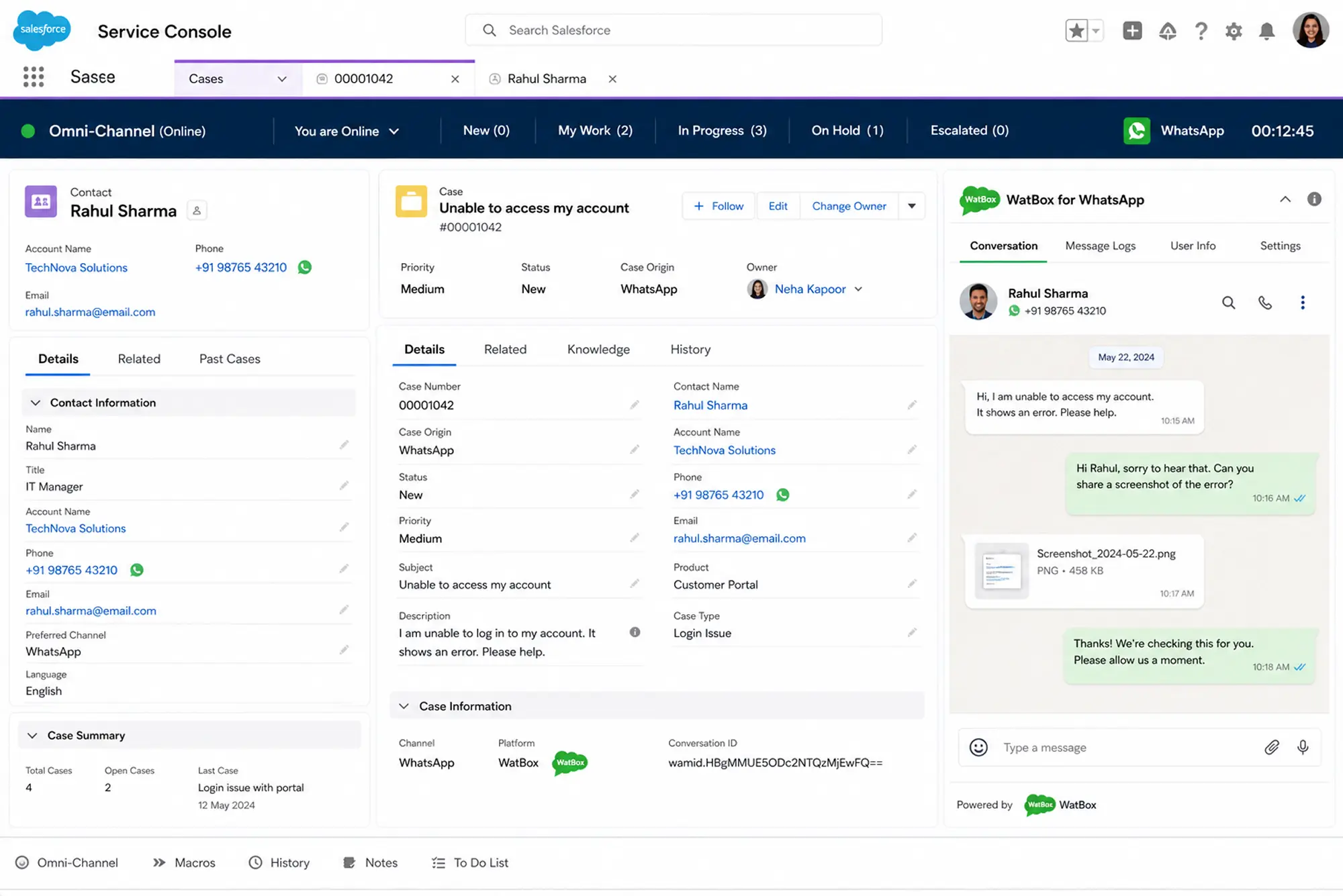
WatBox connects your WhatsApp Business number directly to Salesforce. Every message , inbound and outbound , is recorded against the correct Salesforce record automatically. Here's exactly what that looks like in practice.
Inbound messages create or update records automatically
When a customer sends your business a WhatsApp message for the first time, WatBox checks whether that phone number exists in Salesforce. If it does, the message is appended to the existing Lead, Contact, or Case record. If it doesn't, WatBox creates a new record , a Person Account, Contact, or Lead depending on how you've configured it , and logs the message there.
No manual data entry. No messages falling through the cracks. Every new conversation is captured from the first word.
Every message is stored as a Salesforce activity
Each WhatsApp exchange , text, image, document, or voice message , is stored as an activity on the relevant Salesforce record. Your reps see the full conversation history directly in the account or contact view, in the same place they see emails and call logs. The context is always there before they reply.
Outbound messages are logged too
When a rep sends a WhatsApp message from inside Salesforce , or when an automated Flow sends a template message , that outbound activity is logged against the record just like any other touchpoint. You can see exactly what was sent, when, and by whom.
What You Can Now Report On
Once WhatsApp activity is inside Salesforce, it becomes part of your standard reporting infrastructure. You're not building custom integrations or exporting CSVs. You're running Salesforce reports and dashboards on WhatsApp data the same way you do for any other channel.
Here's what sales ops and RevOps teams are actually measuring once WatBox is in place:
- Response time by rep. How quickly does each team member reply to inbound WhatsApp messages? Which reps are leaving customers waiting? This is now a Salesforce report, not a manager's gut feeling.
- Message volume by pipeline stage. How many WhatsApp touchpoints does a typical deal require before it closes? Are reps over-communicating early and going quiet at the critical decision stage? You can now answer this.
- Template performance. Which message templates are driving replies? Which ones are getting ignored? WatBox tracks delivery and engagement data on broadcast messages sent through Salesforce Campaigns, so marketing ops can optimize copy based on real data.
- WhatsApp vs. email vs. call conversion rates. For the first time, you can compare which channel actually moves deals forward for your specific team and product. This data is gold for sales coaching and process design.
- Opt-out rates and compliance tracking. WatBox tracks every opt-out from WhatsApp communications and updates the relevant Salesforce record automatically. Your compliance team can run a report on opt-out rates by campaign, by region, or by message type , without chasing down data from a separate tool.
Learn about WatBox's WhatsApp marketing and campaign tracking →
The Data Model: How WatBox Maps WhatsApp to Salesforce Objects
One thing Salesforce admins always ask: where does the data actually live? The short answer is , wherever you configure it to.
WatBox supports full object-level configuration. You can map different WhatsApp numbers to different Salesforce objects. A dedicated sales number routes conversations to Leads and Opportunities. A support number routes to Cases. A partner-facing number can be configured to route through Experience Cloud to the relevant partner record.
All media files , images, PDFs, documents up to 12MB , are stored directly in Salesforce against the relevant record. Larger files trigger a notification so agents can handle them through an appropriate channel. Nothing is stored in a third-party system outside your Salesforce org.
This matters for GDPR compliance, data governance, and for any organisation where Salesforce is the single source of truth for customer data.
What Your Salesforce Dashboard Looks Like After WatBox
Before WatBox, a typical Salesforce activity dashboard for a sales team shows emails and tasks. Call logs if the team is disciplined. A lot of gaps where the real customer conversations happened.
After WatBox, the same dashboard shows the full picture: every WhatsApp exchange mapped to the right stage, the right rep, and the right account. Pipeline reporting reflects reality. Coaching conversations are based on actual evidence. And when a rep moves on, their entire conversation history stays exactly where it belongs , in Salesforce, accessible to whoever takes over the account.
The goal isn't to surveil your team. It's to give you the visibility you need to replicate what's working, fix what isn't, and make decisions based on complete data.
Try WatBox Free for 15 Days
If WhatsApp is part of how your team communicates with customers , and for most businesses it already is , you need that activity in Salesforce. Not in a shared phone. Not in someone's personal chat history. In the CRM where it can be tracked, reported on, and acted on.
WatBox gets you there without a development project. Setup takes days, not months. And your Salesforce reports start reflecting reality from day one.
