

Evaluating WhatsApp Integrations on the Salesforce AppExchange? Read This First
If you've spent time on the Salesforce AppExchange looking for a WhatsApp integration, you already know the problem: there are dozens of options, and almost none of them make it easy to understand what "integration" actually means in practice.
Some are webhook forwarders dressed up with a Salesforce logo. Some require a developer to configure. Some store your customer conversations in a third-party database that isn't your Salesforce org. A few are genuinely native, meaning they live inside Salesforce, use Salesforce's data model, and feel like a feature Salesforce itself built.
This guide gives you the evaluation framework to tell the difference , and shows you exactly where WatBox sits on that spectrum.
Start your 15-day free trial of WatBox , no credit card required →
Why "Salesforce Integration" Means Very Different Things
The first thing to understand is that "WhatsApp integration with Salesforce" is a spectrum, not a binary. Before you evaluate any tool, it helps to know where different approaches fall.
Level 1 Notification only. The tool receives a WhatsApp message and sends a notification to a Salesforce user. No record creation. No conversation logging. No two-way messaging inside Salesforce. This is barely an integration , it's a forwarding service.
Level 2 Message sync. Conversations are captured and stored, but in a separate database or a custom object that isn't part of your standard Salesforce data model. You can see messages, but they don't connect natively to Leads, Contacts, Cases, or Opportunities. Reporting is limited. Automation is difficult.
Level 3 Native Salesforce integration. WhatsApp conversations are logged against standard Salesforce objects. New contacts or leads are created automatically. Outbound messages are sent from inside Salesforce. Salesforce Flows can trigger WhatsApp automations. The data lives in your Salesforce org, not somewhere else. Admins manage it through familiar Salesforce configuration, not a separate admin portal.
Most tools on the AppExchange advertise themselves as Level 3. Many are Level 2. The evaluation criteria below will help you tell the difference in under 20 minutes.
The 7-Point Evaluation Framework for Salesforce Admins
Use these questions when evaluating any WhatsApp integration, including WatBox, against your specific Salesforce setup and business requirements.
1. Where does conversation data actually live?
This is the most important question, and the one vendors are most likely to dodge. Ask directly: is conversation data stored in Salesforce custom objects, or in the vendor's own database?
If it's stored outside Salesforce, you have a data governance problem. You're dependent on a third-party system for customer communication history. If the vendor has an outage, goes out of business, or changes their pricing, your data is at risk. GDPR compliance becomes significantly more complicated.
WatBox stores all conversation data, text, images, documents, voice messages, directly in Salesforce. There is no third-party data storage. Your Salesforce org is the single source of truth, and you retain full ownership and control.
2. Which standard Salesforce objects does it support?
A real native integration should work with the objects your team already uses. At minimum: Lead, Contact, Account, Case, Opportunity. Ideally also Campaign (for bulk messaging), Task/Activity (for conversation logging), and custom objects if your org has a non-standard data model.
Ask the vendor to show you , not just tell you , which objects are supported and how conversations are logged against each one.
WatBox supports Leads, Contacts, Person Accounts, Cases, Opportunities, and Campaigns. It also supports multiple WhatsApp numbers mapped to different objects , a dedicated sales number routing to Leads, a support number routing to Cases.
→ See the full WatBox feature list →
3. Does it work with Salesforce Flows , without custom code?
Automation is where native integrations earn their value. If you can't trigger a WhatsApp message from a Salesforce Flow the same way you'd trigger an email alert, you're going to need developer support every time you want to automate something.
Ask: can a Salesforce admin (not a developer) set up an automated WhatsApp message triggered by a record update, a new lead creation, or a scheduled date field?
WatBox works with Salesforce Flows natively. Admins can build automated WhatsApp sequences , welcome messages, follow-up reminders, appointment confirmations, case status updates , without writing a single line of code.
4. Does it support Salesforce Omni-Channel for routing?
If you're running a service operation on Service Cloud, this is non-negotiable. WhatsApp conversations should route through the same queue and assignment logic as email cases and web chat. Reps should handle WhatsApp from the Service Console, not from a separate interface.
Many tools don't support Omni-Channel routing at all. They land all WhatsApp messages in a shared inbox that has no connection to your Salesforce queues, skills-based routing, or SLA timers.
WatBox integrates with Salesforce Omni-Channel. Cases created from WhatsApp messages flow through assignment rules the same way any other case does.
5. Can you run bulk messaging campaigns from Salesforce Campaigns?
If you want to send broadcast WhatsApp messages to a segmented list of contacts, the gold standard is being able to do it directly from a Salesforce Campaign record , selecting approved message templates and sending to campaign members in one action.
Some tools require you to export a list, upload it to a separate platform, and manage the send outside Salesforce. That defeats the purpose of having an integrated tool.
WatBox supports bulk messaging directly from Salesforce Campaign records, with template selection, delivery tracking, and opt-out management all handled inside Salesforce.
→ See how WatBox handles WhatsApp marketing campaigns →
6. What is the setup path , days or months?
Some WhatsApp integrations require a full Salesforce implementation project: custom object creation, Apex triggers, API configuration, sandbox testing. That's a 6–12 week engagement with a developer or SI partner, before you've sent a single message.
Ask the vendor to walk you through a realistic setup timeline for a standard Salesforce org.
WatBox is designed for plug-and-play deployment. Most customers live within days of install , not weeks. The WatBox team handles onboarding and configuration, and the product is built to work with standard Salesforce objects out of the box.
7. Is it GDPR compliant , and can they prove it?
For any business operating in the EU or handling EU customer data, GDPR compliance is mandatory. Ask specifically: how is consent captured? Where is data stored? How are opt-outs handled? Can you provide documentation?
WatBox is fully GDPR compliant. Data is stored exclusively in your Salesforce org. Consent is captured during the first WhatsApp interaction. Opt-outs are tracked automatically and update the Salesforce record in real time. There is no third-party involvement in data storage.
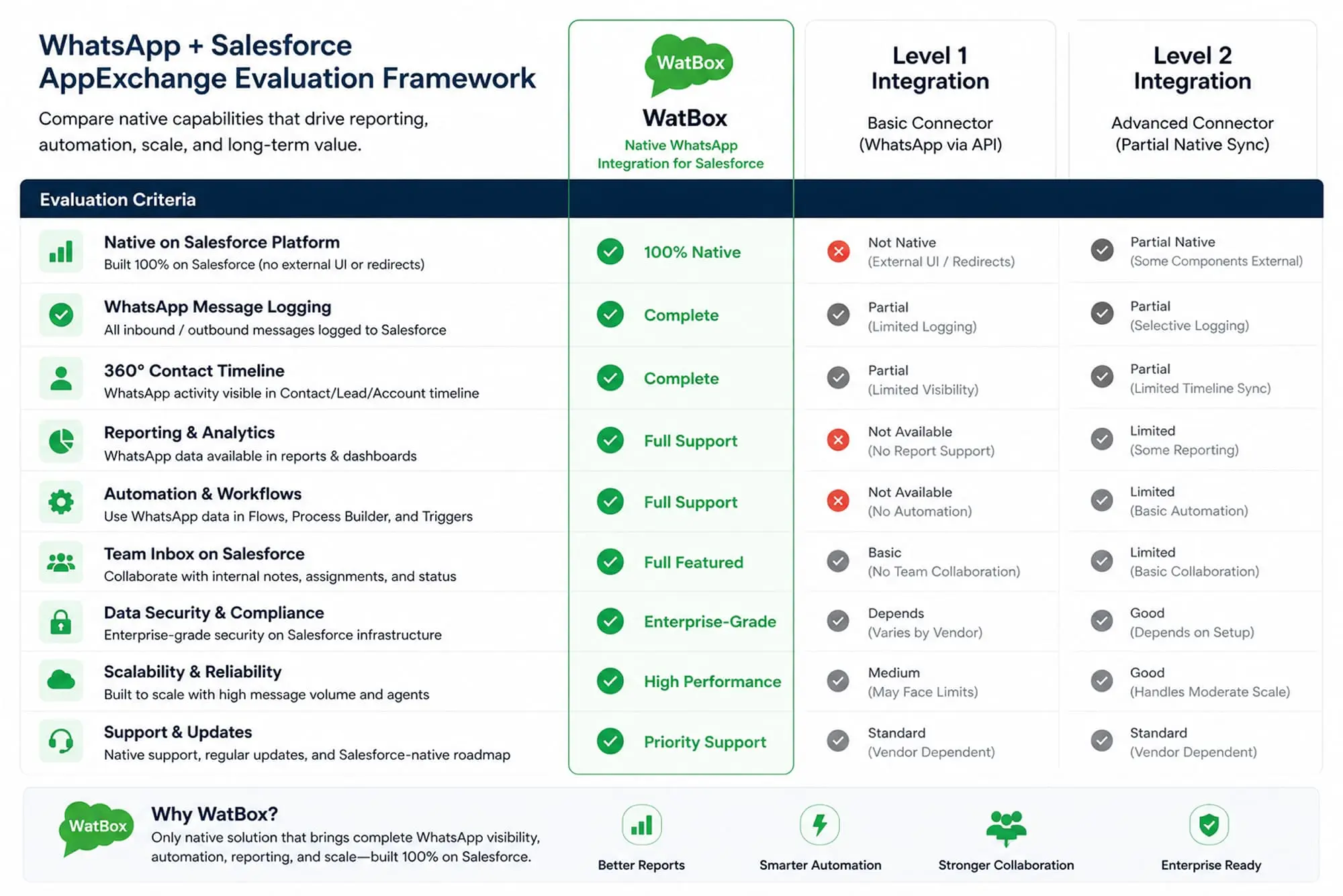
How WatBox Scores Against the Framework
| Evaluation Criterion | WatBox |
|---|---|
| Data stored in Salesforce (not third-party) | ✅ Yes , exclusively in your Salesforce org |
| Standard object support (Lead, Contact, Case, etc.) | ✅ Full support across all key objects |
| Salesforce Flow automation without code | ✅ Native Flow support for all triggers |
| Omni-Channel routing for Service Cloud | ✅ Supported |
| Bulk messaging from Salesforce Campaigns | ✅ Built in with template + opt-out management |
| Setup timeline | ✅ Days, not months |
| GDPR compliance with documentation | ✅ Full compliance, data in Salesforce only |
What Our Customers Say
"Their deployment of WhatsApp within Salesforce was quick and straightforward. We've been able not only to communicate with our clients via WhatsApp, but we've also realised that our clients have been reaching out to us via WhatsApp and now we are able to capture those messages as well." , Vice President, The Cruise Web
"Innovalley has been an exceptional partner in our journey to enhance customer engagement and satisfaction. Their team's expertise in seamlessly integrating WhatsApp into our Salesforce CRM has been instrumental in delivering a seamless and personalised communication experience for our customers." , Director of Sales Operations, Consumer Loans, Verivox
The pattern in these reviews is consistent: fast deployment, native Salesforce behaviour, and conversations that were previously invisible now fully captured in CRM.
One More Thing to Check: AI and the Future Roadmap
A growing number of Salesforce teams want more than messaging , they want AI-assisted responses, Einstein integration, and chatbot automation for high-volume inquiry handling. This is worth asking about during evaluation, because retrofitting AI onto a basic messaging connector is painful.
WatBox supports both Salesforce Einstein AI and ChatGPT integration. Customers running high-volume service operations , like a UAE e-services provider that automated 70% of WhatsApp inquiries , are already using this capability in production.
Ready to Evaluate WatBox in Your Own Org?
The best way to run this evaluation isn't reading comparison posts , it's seeing how the integration actually behaves in a Salesforce environment that looks like yours. WatBox offers a 15-day free trial so you can test the data flow, the automation, the Omni-Channel routing, and the reporting before you make a decision.
👉 Start your 15-day free trial , no credit card required →
👉 Book a demo with the WatBox team →
Have technical questions before you start? Email sales@watbox.ai or call +1 302 304 1537.
